


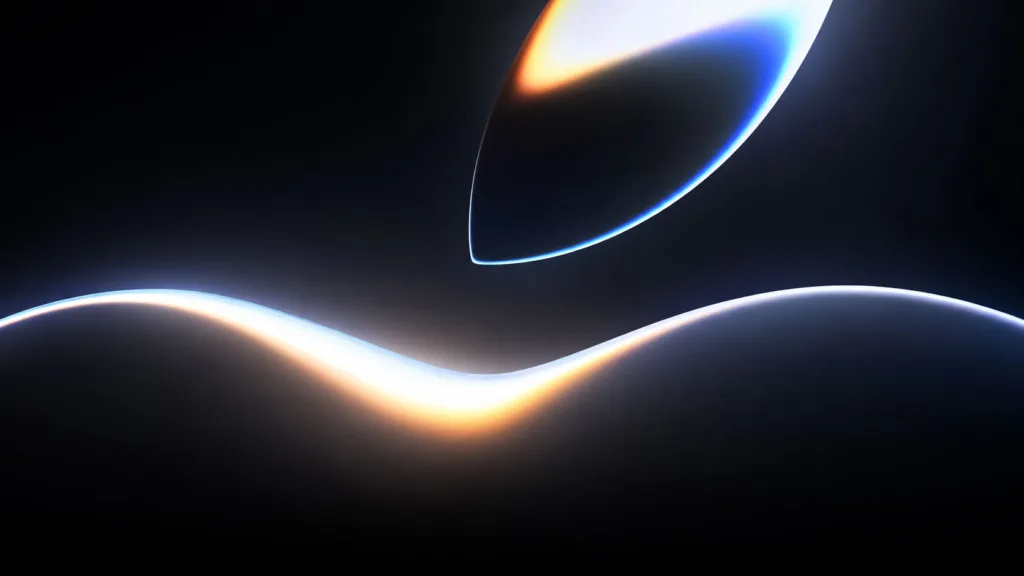
The air crackles with anticipation. Every year, as the scent of fresh macOS and iOS betas fills the digital ether, a particular visual herald arrives: the official WWDC wallpaper. This isn’t just a pretty picture; it’s a tangible piece of the Apple developer universe, a glimpse into the year’s innovations, and a statement of your engagement with the cutting edge of technology. And you, dear reader, are about to discover how to claim your rightful piece of WWDC 2026 for your iPhone, iPad, and Mac.
You’ve likely felt the buzz yourself. Perhaps you’re a seasoned developer, eagerly awaiting the keynotes and the deep dives into new APIs. Or maybe you’re a design enthusiast, drawn to Apple’s signature aesthetic and the artistic expression they infuse into their software. Regardless of your primary motivation, the WWDC wallpaper serves as a unifying symbol, connecting you to the global community of creators and innovators. This year, WWDC 2026 promises to be no different, and securing its iconic artwork for your devices is a straightforward, yet rewarding, process.
The Significance of the WWDC Wallpaper: More Than Just a Pretty Background
You might be wondering, why all the fuss about a wallpaper? It’s a question worth exploring, because the WWDC wallpaper represents something far more profound than a mere aesthetic choice. It’s a symbol, a statement, and a connection.
A Visual Embodiment of Innovation and Progress
Each WWDC marks a pivotal moment in Apple’s ecosystem. It’s where new operating systems are unveiled, transformative features are announced, and the future of their platforms is charted. The wallpaper, therefore, is a direct visual representation of this forward momentum. It’s designed to be bold, inspiring, and representative of the year’s technological leaps. Think back to some of the iconic WWDC wallpapers of the past – they often reflected the themes of the announcements, be it the clean lines of a new design language, the vibrant hues of enhanced visual capabilities, or the intricate patterns hinting at complex underlying technologies. For you, choosing this wallpaper means aligning yourself with that spirit of innovation. It’s a constant reminder of the exciting possibilities that Apple is bringing to your fingertips.
The Artistry Behind the Pixels
Apple doesn’t just slap a logo on a photo. The WWDC wallpapers are meticulously crafted by talented designers. They often involve abstract art, geometric patterns, or stylized representations that require careful consideration of color theory, composition, and thematic relevance. You’re not just downloading an image; you’re downloading a piece of digital art commissioned for a significant event. This level of dedication to visual fidelity elevates the wallpaper from a simple background to a statement of appreciation for creative excellence.
A Community Identifier for the Apple Enthusiast
When you see someone with the WWDC wallpaper on their device, you immediately recognize a kindred spirit. It’s an unspoken acknowledgment of shared interest, a subtle nod to your place within the broader Apple user and developer community. It fosters a sense of belonging, a feeling that you’re part of something bigger than just your individual device. You’re connected to thousands, even millions, of others who are equally excited about what Apple has in store.
Marking Your Participation in the Developer Journey
Whether you’re a professional developer or an aspiring hobbyist, WWDC is your annual pilgrimage. It’s a time for learning, for networking, and for understanding the tools that will shape your future projects. The wallpaper becomes a personal memento of this journey.
A Reminder of Keynotes and Sessions
As you navigate your day, glances at your screen will bring you back to the inspiring keynotes, the insightful sessions, and the mind-expanding labs you’ve attended (or aspire to attend). The wallpaper acts as a visual anchor, helping you recall the knowledge gained and the enthusiasm sparked during the WWDC event. It’s a constant source of motivation, especially when facing challenging coding problems or complex design tasks.
Fueling Future Projects and Creative Endeavors
The energy and inspiration derived from WWDC are meant to fuel your creativity. The wallpaper serves as a visual spark, reminding you of the new technologies and possibilities you’ve learned about. It encourages you to experiment, to push boundaries, and to bring your own innovative ideas to life using the tools Apple provides. You’re not just decorating your device; you’re psychologically priming yourself for creation.
If you’re excited about the latest updates from Apple’s WWDC 2026, you might also be interested in exploring how businesses can enhance their marketing strategies. Check out this insightful article on unlocking true cross-channel consistency with headless marketing, which discusses innovative approaches to creating seamless customer experiences. For more details, visit this link.
Securing Your WWDC 2026 Wallpaper: A Step-by-Step Approach
The anticipation is building, and you’re ready to adorn your devices. Getting your hands on the official WWDC 2026 wallpaper is a straightforward process, designed to be accessible to everyone. Apple typically rolls out these wallpapers through various channels, ensuring you have multiple ways to acquire them.
Method 1: The Official Apple Website – Your Primary Source
Apple’s official website is, unsurprisingly, the most reliable and direct source for obtaining the WWDC 2026 wallpaper. They understand the demand and are always prepared to meet it.
Navigating to the WWDC Section
The first step is to navigate to the dedicated WWDC section of Apple’s website. This is usually prominently featured in the lead-up to and during the event. You might find it under “Developers,” “Events,” or a specific WWDC landing page. Look for banners or links that clearly indicate “WWDC 2026.”
Sub-Navigation Within the WWDC Hub
Once on the WWDC page, you’ll need to pinpoint the specific area that houses the downloadable assets. This often involves looking for sections labeled “Resources,” “Downloads,” or “Wallpapers.” Apple is generally quite organized, so this shouldn’t be too difficult to find.
Identifying and Downloading the Wallpaper Files
Apple typically offers the wallpapers in various resolutions optimized for different devices. You’ll likely find separate downloads for iPhone, iPad, and Mac. Click on the appropriate download link for your device. The files will usually be in common image formats like JPEG or PNG.
Verifying the Resolution and File Type
Before downloading, take a moment to confirm the resolution. For Macs, you’ll want a high-resolution image that matches your display’s pixel density. For iPhones and iPads, resolutions are often tailored to specific models. Ensure the file type is standard for easy compatibility.
Method 2: Third-Party Websites and Communities – With Caution
While the official website is your best bet, the sheer demand and the passionate Apple community often lead to unofficial distribution channels. These can be quick, but they require a discerning eye.
Leveraging Developer Forums and Communities
Websites like Reddit (specifically subreddits dedicated to Apple, macOS, or iOS customization), developer forums, and tech news sites are excellent places where enthusiasts often share links to downloadable wallpapers as soon as they become available. These communities are usually quick to identify and share official sources or high-quality leaks.
Relying on Trusted Tech News Outlets
Reputable technology news publications often feature articles detailing the WWDC announcements, and these articles frequently include direct links to download the official wallpapers. These sites are generally reliable and prioritize legitimate sources.
The Importance of Verification – Avoiding Malicious Downloads
It is paramount that you exercise extreme caution when downloading from unofficial sources. Always ensure the website is reputable and that the download link is not leading you to a deceptive site. Malware and adware can be disguised as wallpaper files, so proceed with vigilance.
Checking File Signatures and Sources
If possible, and if you’re technically inclined, look for any information about the source of the download. While not always feasible for end-users, understanding where the file originates from can provide a layer of security. Stick to well-known and trusted community hubs.
Tailoring the WWDC 2026 Wallpaper to Your Devices
Once you’ve secured the official WWDC 2026 wallpaper, the next exciting step is to apply it to your devices. This is where you personalize your digital workspace and showcase your connection to the Apple ecosystem.
Applying to Your iPhone: A Burst of Inspiration on Your Palm
Your iPhone is your constant companion, and its lock screen and home screen are prime real estate for personalized content.
Setting as Lock Screen: The First Impression
Upon downloading the wallpaper to your iPhone, navigate to Settings > Wallpaper. Tap on “Choose a New Wallpaper” and select the WWDC 2026 image from your Photos app. You can then position it and choose whether to set it for your Lock Screen, Home Screen, or both. The Lock Screen is the first thing you see, making it a powerful statement.
Utilizing Dynamic and Still Options
Depending on the wallpaper’s design, Apple might offer dynamic or still versions. A dynamic wallpaper might subtly animate, adding an extra layer of visual interest. Experiment to see which best suits your preference and the wallpaper’s aesthetic.
Customizing Your Home Screen Background
For your Home Screen, you can choose to have the same wallpaper as your Lock Screen or a different one. If you opt for the same, you might have the option to blur the wallpaper on the Home Screen to make your app icons stand out more clearly. This is a key consideration for usability.
Adjusting for App Icons and Widgets
When setting your Home Screen wallpaper, consider how it will interact with your app icons and widgets. Some wallpapers might have busy backgrounds that could make it harder to distinguish between icons. You can often adjust the wallpaper’s position or choose to slightly blur it to mitigate this.
Applying to Your iPad: Expanding Your Creative Canvas
Your iPad, with its larger screen, offers a more expansive canvas for the WWDC 2026 wallpaper. This is where you can truly appreciate the intricate details of Apple’s design.
Seamless Integration on the Larger Display
Similar to your iPhone, you’ll go to Settings > Wallpaper on your iPad. Select “Choose a New Wallpaper” and pick your WWDC 2026 image. The larger screen allows for greater detail to be appreciated.
Optimizing for Landscape and Portrait Modes
Consider how the wallpaper looks in both landscape and portrait orientations. Some designs might be more visually appealing in one mode over the other, or you might want to consider slightly different crops or positions for each.
Creating a Cohesive Look Across Your Apple Ecosystem
If you use multiple Apple devices, you can aim for a cohesive visual theme by using the same or complementary wallpapers across your iPhone, iPad, and Mac. This creates a unified brand experience for your personal technology.
Syncing with iCloud for Effortless Application
If you have iCloud Photos enabled, downloading the wallpaper to one device will make it available across all your devices signed into the same Apple ID. This simplifies the process of applying it everywhere.
Applying to Your Mac: Elevating Your Desktop Environment
Your Mac’s desktop is your primary workspace, and the WWDC 2026 wallpaper can transform it into an inspiring hub of productivity.
Setting Your Desktop Background in macOS
On your Mac, go to System Settings (or System Preferences) > Wallpaper. You’ll see various options, including “Add Folder” or directly selecting from your Photos. Find your downloaded WWDC 2026 wallpaper and select it.
Adjusting for Different Screen Resolutions and Multiple Displays
If you have a Retina display or multiple monitors, ensure you download the highest resolution version of the wallpaper available. macOS generally handles scaling well, but starting with the right resolution is key for clarity. For multiple displays, you can often set different wallpapers for each screen.
Fine-Tuning for Optimal Clarity and Aesthetics
Just like on your iPhone and iPad, consider how the wallpaper interacts with your desktop icons and dock. If the wallpaper is too busy, it might make it harder to find your files. macOS allows you to adjust the wallpaper’s position and, in some cases, apply effects like blur.
Utilizing Dynamic Desktop Features (if applicable)
Some macOS versions support Dynamic Desktops, where the wallpaper changes subtly throughout the day. While not always available for official WWDC wallpapers, keep an eye out for this feature if Apple introduces a dynamic version.
Beyond the Wallpaper: Diving Deeper into WWDC 2026
Obtaining the WWDC 2026 wallpaper is just the beginning of your engagement with this significant event. It’s a gateway to a world of innovation and learning that you can actively participate in.
Accessing WWDC Sessions and Keynotes
The wallpaper is a reminder of the wealth of knowledge shared during WWDC. Apple makes all the keynotes and sessions available online after they air.
The Official WWDC App and Website Archive
Apple typically hosts all WWDC content on the official WWDC app and its website. You can revisit sessions that piqued your interest or catch up on those you missed. This is where the true learning happens.
Deep Dives into New APIs and Frameworks
For developers, these sessions are invaluable for understanding the intricacies of new APIs, frameworks, and development tools. The wallpaper serves as a visual cue to return to these learning resources.
Exploring Developer Resources and Documentation
Beyond the video content, comprehensive documentation, code samples, and developer resources are released during WWDC. These are essential for implementing the new technologies.
Staying Up-to-Date with Apple’s Developer Technologies
The wallpaper is a testament to your interest in staying current. Engaging with the documentation ensures you’re not just appreciating the art but also mastering the tools that drive Apple’s ecosystem.
Participating in Apple’s Developer Community
WWDC is a communal experience, and the wallpaper is a symbol of your belonging to this global network.
Engaging in Forums and Developer Groups
Connect with other developers and enthusiasts online. Share your thoughts on the new announcements, ask questions, and collaborate on projects. The wallpaper can be an easy icebreaker in online discussions.
Sharing Your Own Creations Inspired by WWDC
As you learn and grow through WWDC, consider sharing your own projects and innovations. The same creativity that goes into designing the wallpaper can be channeled into your own software and designs.
Future-Proofing Your Skills and Knowledge
By actively engaging with WWDC content and the developer community, you are investing in your own future. The skills and knowledge you acquire will be instrumental in shaping the next generation of apps and experiences.
If you’re excited about the latest updates from Apple’s Worldwide Developers Conference, you might also find it interesting to explore how companies are enhancing their security measures in the digital landscape. A related article discusses implementing zero trust for cloud environments, which can be crucial for developers looking to protect their applications. You can read more about this important topic in the article on zero trust strategies by following this link: zero trust for cloud.
A Final Thought: Your Digital Canvas Awaits
You’ve learned how to acquire the official WWDC 2026 wallpaper and how to apply it to your iPhone, iPad, and Mac. But remember, this wallpaper is more than just a digital decoration. It’s a symbol of your connection to innovation, your participation in the Apple developer journey, and your place within a vibrant global community.
As you gaze at your newly adorned devices, let the WWDC 2026 wallpaper inspire you. Let it remind you of the possibilities that lie ahead, the challenges you can overcome, and the incredible creations you can bring to life. This is your digital canvas, and with the spirit of WWDC fueling your inspiration, you have the power to paint something truly remarkable. So, go forth, download your wallpaper, and let the journey of innovation continue. Embrace the visual identity, and let it guide you through the exciting year of WWDC 2026 and beyond. Your devices are ready, and your creative potential is boundless.
FAQs
1. What is WWDC 2026?
WWDC stands for Worldwide Developers Conference, an annual event hosted by Apple for software developers. It is a platform for Apple to announce new software updates, technologies, and tools for developers.
2. What is the official WWDC 2026 wallpaper?
The official WWDC 2026 wallpaper is a digital image designed by Apple to commemorate the event. It is available for download and can be used as a background on iPhone, iPad, and Mac devices.
3. How can I download the official WWDC 2026 wallpaper?
The official WWDC 2026 wallpaper can be downloaded from the Apple website, the App Store, or through the Settings app on iPhone, iPad, and Mac devices. It is typically made available for free.
4. Can I use the official WWDC 2026 wallpaper on any device?
Yes, the official WWDC 2026 wallpaper is designed to be compatible with iPhone, iPad, and Mac devices. It can be used as a background on these devices without any issues.
5. Is the official WWDC 2026 wallpaper customizable?
The official WWDC 2026 wallpaper may be customizable to some extent, depending on the device and software version. Users may be able to adjust the wallpaper’s appearance, such as its size and position, to suit their preferences.