


You’ve probably experienced it: browsing a website that desperately wants to know where you are. Maybe it’s a store locator, a local news site, or a food delivery app. Traditionally, your options were a blunt “allow” or “block” – either give up your precise coordinates or deny access entirely. But Google Chrome is changing the game, offering a more nuanced approach to location sharing. You now have the power to share your approximate location, a significant step forward for your privacy and user experience.
You’re a discerning internet user, and you value your privacy. The digital world is constantly evolving, and keeping up with new features that protect your personal information is crucial. Google Chrome’s approximate location sharing isn’t just a minor update; it’s a fundamental shift in how you interact with websites that request your location. This new feature empowers you, giving you greater control over your digital footprint.
The Old Way: All or Nothing
Think back to the old location permission prompts. A website would ask for your location, and you’d see a pop-up. Your choices were stark: “Allow” or “Block.”
- “Allow”: This meant the website received your precise GPS coordinates, often down to a few meters. For some services, like ride-sharing or emergency services, this precision is essential. But for many others, it’s overkill.
- “Block”: This denied the website any location information, making certain features unusable. You might not be able to find the nearest store, get local weather, or see relevant search results tailored to your general area.
This binary choice presented a dilemma. You wanted the convenience of location-based services, but you were understandably hesitant to broadcast your exact whereabouts to every website that asked. The risk of data misuse, tracking, or even security concerns always lingered in the back of your mind.
The New Way: A Spectrum of Control
Now, with approximate location sharing, Chrome offers you a third, more palatable option. When a website requests your location, you’ll see a new prompt. Instead of just “Allow” and “Block,” you’ll likely have the choice to “Allow precise location,” “Allow approximate location,” or “Block.”
- “Allow precise location”: This is the familiar option, granting the website access to your exact GPS coordinates. You’ll still use this for services where pinpoint accuracy is critical.
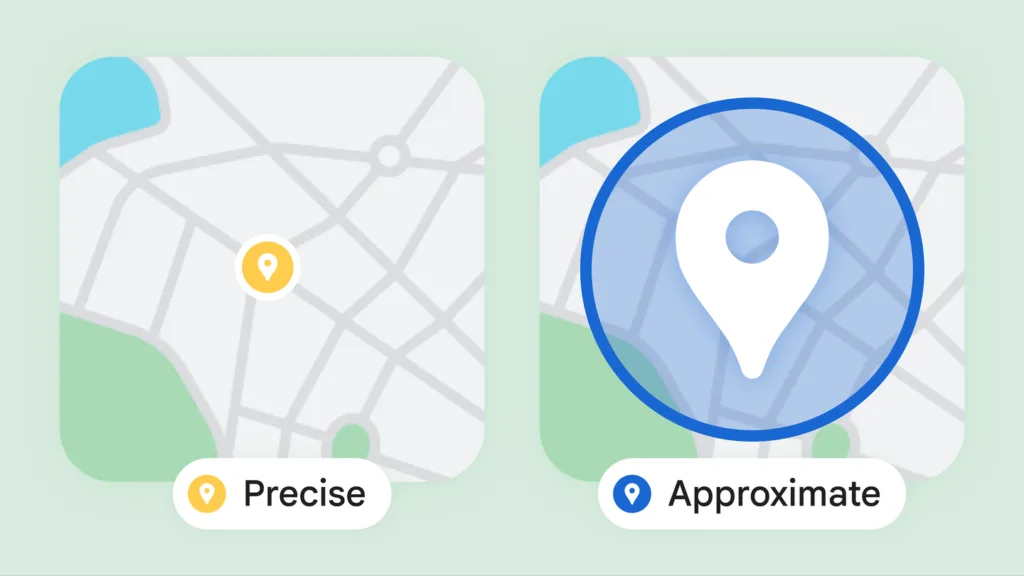
- “Allow approximate location”: This is the game-changer. When you select this, Chrome provides the website with a location that is roughly in your general area, but not your specific address. It might be within a few square kilometers, or even a larger region, depending on factors like your Wi-Fi network and IP address. The key is that it’s intentionally imprecise.
- “Block”: This still completely denies location access, just as before.
This tiered approach puts you firmly in the driver’s seat. You no longer have to compromise between utility and privacy. You can enjoy the benefits of localized content without revealing your exact position, creating a much more comfortable and secure browsing experience.
In a significant update, Google Chrome has finally introduced the feature that allows users to share their approximate location with websites, enhancing both privacy and user experience. This change aims to provide a more tailored browsing experience while ensuring that users maintain control over their personal information. For those interested in improving their online presence and understanding how to effectively communicate their brand, you might find this article on weaving brand messaging into high-converting sales copy particularly insightful.
How Approximate Location Sharing Works
You might be wondering, how does Chrome actually achieve this “approximate” location? It’s not magic; it’s a clever combination of technologies and intentional imprecision. Understanding the underlying mechanisms will further empower you to make informed decisions about your location data.
The Technology Behind the Imprecision
When you opt for approximate location, Chrome doesn’t just randomly guess your location. It employs a multi-faceted approach to determine a general area while deliberately obscuring your precise coordinates.
- IP Address Geo-location: Your IP address, assigned to you by your internet service provider, can be used to infer your general geographic region. While an IP address isn’t precise enough to pinpoint your house, it can often identify your city or a large neighborhood. Chrome leverages this existing, less precise data source.
- Known Wi-Fi Access Points: Chrome, like many modern devices, uses data from nearby Wi-Fi networks to help determine your location. Even if you’re not connected to a particular network, your device can detect its presence. Google maintains a massive database of Wi-Fi access points and their approximate locations. When you choose approximate location, Chrome might use information from a cluster of nearby Wi-Fi networks to define a broader area, rather than a single, highly accurate point.
- Cell Tower Triangulation (on mobile): For mobile devices, the proximity to various cell towers can also help in determining a general location. Again, this isn’t designed for pinpoint accuracy but can contribute to identifying a larger zone.
- Intentional “Fuzzing”: This is a crucial element. Even if Chrome has a relatively precise idea of your location through the above methods, when you select approximate location, it deliberately adds “fuzz” or noise to that data. It might report a location that’s a few blocks or even kilometers away from your actual spot, ensuring that your true precise location is not revealed. This isn’t about deception; it’s about respectful obfuscation.
What Websites See (and Don’t See)
When a website requests your location and you grant approximate access, it receives a set of coordinates. However, these coordinates are not your actual latitude and longitude. Instead, they represent a larger area.
- A Bounding Box: Instead of a single point, some implementations might provide the website with a “bounding box” – a rectangular area within which Chrome knows you are located. The website then interprets this as your general area.
- A Falsified Point within an Area: Alternatively, Chrome might report a specific set of latitude and longitude coordinates that fall within a larger, general area where you are present. This reported point will not be your actual location, but a point within the intentionally broadened zone.
- Reduced Accuracy: The key differentiator is the reduced accuracy. Websites that previously received data with meters of precision will now receive data with kilometers of precision. This fundamentally changes their ability to track your movements or pinpoint your exact dwelling.
Understanding these technical aspects helps you appreciate the privacy benefits of this feature. You’re not just hoping for the best; Chrome is actively working to make your location data less precise and therefore less identifiable.
Practical Benefits for You

You might be thinking, “This sounds good in theory, but how does it actually improve my day-to-day browsing?” The benefits of approximate location sharing are numerous and touch upon various aspects of your online life.
Enhanced Privacy, Reduced Worry
This is perhaps the most significant benefit. You no longer have to feel like you’re constantly broadcasting your precise location to every corner of the internet.
- Protection from Unnecessary Tracking: Many websites don’t need your exact address. A news site wants to show you local headlines; a weather site wants to give you the forecast for your city. Your house number is irrelevant. With approximate location, you prevent these sites from collecting overly specific data that could potentially be used for tracking or profiling.
- Reduced Digital Footprint: Every piece of data you share contributes to your digital footprint. By sharing less precise location data, you’re actively reducing the amount of identifiable information available about you online. This makes it harder for data brokers or advertisers to build detailed profiles based on your real-world movements.
- Peace of Mind: Simply knowing that you have this control can significantly reduce your anxiety about online privacy. You can browse more freely, knowing that you’re not inadvertently revealing sensitive information.
Smarter, More Relevant Content (Without Sacrificing Privacy)
One of the main reasons websites request location is to provide you with tailored content. Approximate location sharing allows them to do this effectively, without demanding your precise coordinates.
- Local Recommendations: When you search for “restaurants near me,” approximate location will still allow Chrome to show you restaurants in your general vicinity. You’ll get relevant results without revealing your home address to every eatery in town.
- Local News and Events: Want to know what’s happening in your city or region? Approximate location will enable news websites to deliver hyper-local content to you, keeping you informed without knowing precisely where you lay your head at night.
- Localized Search Results: Search engines, when given approximate location, can still deliver results more relevant to your current area. If you search for “hardware store,” you’ll get results for hardware stores in your town, not ones a hundred miles away. This improves the utility of your searches without giving up too much personal data.
- Weather Updates: Get accurate weather forecasts for your general area, ensuring you’re prepared for the day without revealing your exact street.
Avoiding the “Location Denied” UX Dead End
Before, if you blocked location access entirely, many websites would simply break or offer a degraded user experience. Now, you have a middle ground.
- Functional Websites: Websites that rely on location to some extent will still be functional. A store locator might show you all locations in your city, allowing you to select the precise one you’re interested in, without needing to know your exact starting point.
- Improved User Experience: You avoid the frustration of features being unavailable or having to manually enter your location repeatedly. This leads to a smoother, less interrupted browsing experience.
- Reduced Manual Input: Instead of typing in your city or zip code every time a website asks for your location, you can simply grant approximate access and let Chrome handle it. This saves you time and effort.
You are gaining control, convenience, and peace of mind – a trifecta of benefits driven by this intelligent new feature.
Managing Your Location Permissions in Chrome

You’ve got the power, but knowing how to wield it is essential. Google Chrome provides you with robust tools to manage your location permissions, both on a site-by-site basis and globally. This ensures you’re always in control of what information you share.
Granting Permissions: The Initial Prompt
When a website first requests your location, you’ll see a distinct prompt. This is your first opportunity to choose your level of location sharing.
- Look for the Options: The prompt will typically appear at the top-left of your browser window, near the address bar. It will clearly state which website is requesting your location.
- Choose Wisely: You’ll see options like “Allow (precise),” “Allow (approximate),” or “Block.” Take a moment to consider if the website truly needs your precise location. For most general browsing, “Allow (approximate)” is the stronger privacy choice.
- Remember Your Choice: Chrome often remembers your choice for a particular website. If you allow approximate or precise location, the next time you visit that site, it might automatically use your previous preference. This is for convenience, but you can always change it.
Reviewing and Revoking Permissions: Site-Specific Settings
You can always go back and adjust location permissions for individual websites. This is incredibly useful if you change your mind or if a website’s behavior raises concerns.
- Click the Site Information Icon: To the left of the website’s URL in the address bar, you’ll see a small icon – often a padlock, or a circle with an “i” inside. Click this icon.
- Access Site Settings: In the dropdown menu that appears, look for “Site settings” or “Permissions.” Click on this.
- Adjust Location Permissions: You’ll be taken to a dedicated settings page for that specific website. Here, you’ll find a “Location” entry. You can change it to “Allow (default),” “Allow (precise),” “Allow (approximate),” or “Block.”
- Clear Data and Reset: There’s often an option to “Clear data” or “Reset permissions” on this page. If you want to completely wipe the slate clean for a website and force it to ask for permissions again, this is your tool.
Global Location Settings: A Comprehensive Overview
For a broader view of all your location permissions and to set a default behavior, you can delve into Chrome’s global settings.
- Open Chrome Settings: Click the three-dot menu icon in the top-right corner of Chrome, then select “Settings.”
- Navigate to Privacy and Security: In the left-hand sidebar, click on “Privacy and security.”
- Go to Site Settings: Under the “Privacy and security” section, you’ll find “Site Settings.” Click on this.
- Find Location Settings: Within “Site Settings,” scroll down until you see “Location.” Click on it.
- Default Behavior: Here, you can set a default behavior for all websites. Your options might include:
- “Sites can ask for your location (recommended)” – This allows the prompt to appear each time a site asks.
- “Sites are not allowed to ask for your location” – This globally blocks all location requests, effectively acting as perpetual “Block” for every site.
- “Approximate location is used for site requests” – This will default sites to approximate location if they support it.
- Review Allowed/Blocked Sites: Below the default settings, you’ll see lists of “Allowed to see your location” and “Not allowed to see your location” sites. You can review these lists and remove or edit permissions for any site directly from here. Look for entries labeled “Precise” or “Approximate” to differentiate the type of access granted.
By regularly reviewing these settings, you maintain tight control over who has access to your location data, ensuring that your privacy preferences are always up-to-date and enforced.
Google Chrome’s recent update allowing users to share their approximate location with websites marks a significant step towards enhancing user privacy while still providing personalized experiences. This feature enables websites to access location data without pinpointing the user’s exact whereabouts, thus balancing convenience and security. For those interested in understanding how data can be managed more effectively in the digital landscape, an insightful article on building a future-ready reusable data platform can be found here. This resource delves into the importance of data synergy in creating robust systems that respect user privacy while maximizing utility.
What This Means for Web Developers and Websites
| Metrics | Data |
|---|---|
| Feature | Sharing approximate location with websites |
| Browser | Google Chrome |
| Implementation | Finally supported |
You’re a consumer of the internet, but it’s also worth understanding the other side of the coin. This new feature isn’t just about empowering you; it’s also a significant shift for web developers and website owners. While beneficial for users, it requires websites to adapt how they request and utilize location data.
Adapting to Less Precise Data
Web developers can no longer assume they will always receive precise GPS coordinates from every user.
- Rethinking Location Dependencies: Websites that are heavily reliant on pinpoint accuracy will need to explicitly request precise location, and be prepared for users to deny it. They must also consider alternative fallbacks, such as asking for a zip code or city if precise access is denied.
- Designing for Breadth: Services that don’t need exact coordinates – like news, weather, or general store locators – should build their functionality to gracefully handle approximate location data. This means their mapping and search algorithms need to be able to work effectively with broader geographic areas, rather than single points.
- Clear Communication: Websites need to clearly communicate why they need location access and what level of access is necessary. If they need precise location for a specific feature (e.g., real-time delivery tracking), they should explain that to the user, justifying the request for more granular data.
The Geolocation API and New Parameters
Under the hood, this functionality is being integrated into the existing Geolocation API that websites use.
- The
accurateParameter: Developers can now specify aUser-Agentstring or a new parameter within the Geolocation API call (the specifics are still evolving but the concept exists) to indicate whether they prefer precise or approximate location. This allows websites to signal their needs to the browser. - Browser Interpretation: Chrome will then interpret this request alongside your user preference. If a site requests precise location, but your global setting is “approximate,” or you choose “approximate” in the prompt, Chrome will provide the less granular data.
- Error Handling: Developers will also need to enhance their error handling. If a user denies location entirely, or only grants approximate when precise is required, the website needs to respond gracefully. This might involve prompting the user to manually enter their location or suggesting alternative ways to use the service.
Ultimately, this new feature pushes the web towards a more privacy-centric design. Websites that prioritize user trust and transparent data practices will benefit from higher user engagement and less friction when requesting location data. You, as the user, will directly experience the results of this adaptation through more thoughtful and privacy-respecting online interactions.
FAQs
What is the new feature in Google Chrome regarding location sharing?
Google Chrome now supports sharing your approximate location with websites, allowing users to have more control over their privacy while still providing location-based services.
How does this new feature work?
When a website requests the user’s location, Google Chrome will now give the option to share their approximate location instead of their precise location. This helps protect the user’s privacy while still allowing the website to provide relevant location-based services.
Why is sharing approximate location important for privacy?
Sharing approximate location instead of precise location helps protect the user’s privacy by providing a general idea of their location without revealing their exact coordinates. This can prevent potential misuse of location data by websites and third-party services.
Can users still choose to share their precise location with websites?
Yes, users can still choose to share their precise location with websites if they prefer. Google Chrome gives users the option to select whether they want to share their approximate or precise location when prompted by a website.
Is this feature available on all devices and platforms?
Yes, the new feature of sharing approximate location is available on all devices and platforms where Google Chrome is supported, including desktop and mobile devices.