


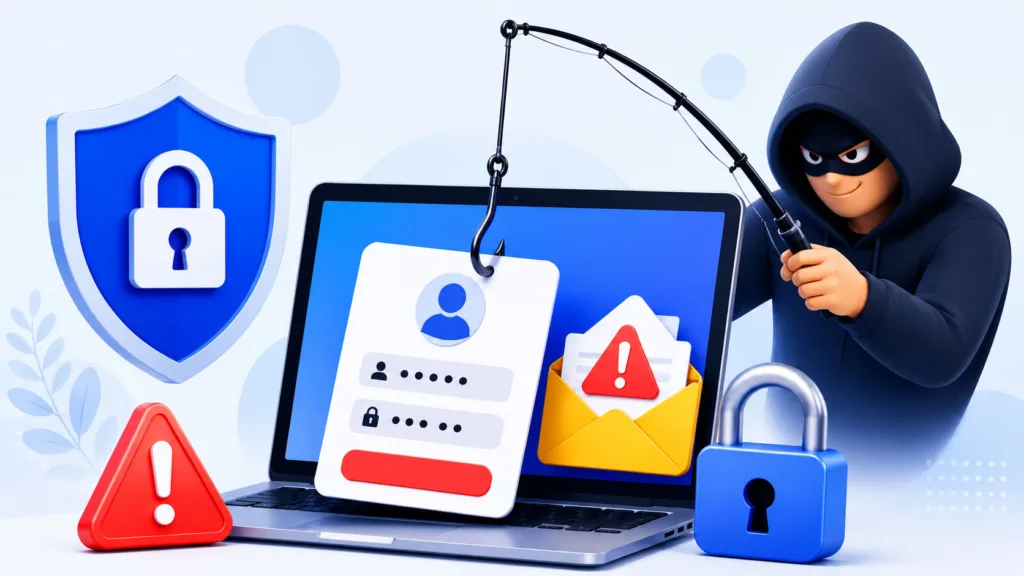
You’re going about your day, perhaps checking your email, browsing social media, or even responding to a text message. Suddenly, something catches your eye. An urgent email from your bank, a tempting offer from a well-known brand, or a dire warning from a government agency. Your immediate reaction might be a slight sense of panic, curiosity, or even excitement. But pause for a moment. Could this be a trick? You’re entering the world of phishing, a highly prevalent and dangerous cyber threat. Understanding what phishing is, how it works, and how to protect yourself is no longer optional; it’s essential for your digital safety.
You might hear the term “phishing” thrown around, but do you truly grasp its insidious nature? Phishing is a type of cyberattack where perpetrators disguise themselves as trustworthy entities to trick you into revealing sensitive information. Think of it as a digital con artist, meticulously crafting a believable persona to reel you in. The “fish” in this scenario is you, and the “bait” is the deceptive message.
The Art of Deception: How Phishing Works
You see, phishing isn’t about brute force hacking; it’s about manipulation. The attackers don’t try to break into your accounts directly. Instead, they try to trick you into giving them the keys. They exploit your trust, your curiosity, your fear, or even your desire for a good deal.
Common Targets for Your Information
What exactly are these cyber criminals after? Typically, they seek information that can be monetized or used for further nefarious activities. This often includes:
- Login Credentials: Your usernames and passwords for online banking, email, social media, and other crucial accounts.
- Financial Information: Credit card numbers, bank account details, and even social security numbers.
- Personal Identifiable Information (PII): Your full name, address, date of birth, phone number, and other data that can be used for identity theft.
Phishing scams continue to pose significant risks to individuals and organizations alike, making it essential to stay informed about the latest security practices. For those looking to enhance their understanding of online security, a related article titled “The Role of Observability in Maintaining High-Performance APIs” provides valuable insights into how monitoring and observability can help detect and prevent various cyber threats, including phishing. You can read more about it here: The Role of Observability in Maintaining High-Performance APIs.
Recognizing the Red Flags: Spotting Phishing Attempts
You’re a discerning individual, and you pride yourself on being savvy online. But phishing attacks are becoming increasingly sophisticated. To protect yourself, you need to become a master at spotting the subtle (and sometimes not-so-subtle) signs that something isn’t right. Train your eye to look for these common red flags.
Suspicious Sender Information
This is often your first line of defense. You’ve received an email, but who is it really from?
- Mismatched Email Addresses: The display name might say “Apple Support,” but the actual email address is a jumble of random letters or comes from a generic domain like
hot.mail.cominstead ofapple.com. Always inspect the full email address. - Typos or Variations in Domain Names: Scammers often register domain names that are very similar to legitimate ones, hoping you won’t notice the subtle difference. For example,
gooogle.cominstead ofgoogle.com. - Generic Greetings: If an email purports to be from your bank but starts with “Dear Customer” instead of your name, be suspicious. Legitimate organizations typically personalize their communications.
Urgency and Threats: Playing on Your Emotions
Phishing attacks often leverage strong emotional triggers to bypass your critical thinking. They want you to act now, before you have time to think.
- Immediate Action Required: Messages like “Your account will be suspended if you don’t click here immediately” or “Urgent security alert: Log in to verify your identity now.”
- Threats of Consequences: Warnings of account closure, financial penalties, or even legal action if you don’t comply.
- Too Good to Be True Offers: “You’ve won a lottery you didn’t enter!” or “Get a free iPhone by filling out this survey!” If it seems unbelievably good, it almost certainly is.
Poor Grammar and Spelling
While not all phishing emails contain errors, a significant number still do. Genuine organizations usually have professional communication teams review their messages.
- Numerous Typos: Look for obvious spelling mistakes that a legitimate company wouldn’t make.
- Awkward Phrasing: Sentences that sound unnatural or are grammatically incorrect in ways that suggest they weren’t written by a native speaker.
Suspicious Links and Attachments
This is where the real danger often lies. Clicking a malicious link or opening an infected attachment can compromise your entire system.
- Hover Before You Click: Before clicking any link, hover your mouse cursor over it. A small pop-up should display the actual URL. If the displayed URL doesn’t match the context (e.g., a link labeled “Bank of America” actually points to
suspiciouswebsite.ru), do NOT click it. - Unexpected Attachments: Never open an attachment from an unknown sender or an attachment you weren’t expecting, even if it appears to be from someone you know. It could contain malware. Common malicious file types include
.exe,.zip,.js, and documents with macros enabled.
Types of Phishing: It’s Not Just Email Anymore

You might primarily associate phishing with email, but the landscape of these attacks has broadened significantly. Cybercriminals are always adapting, and so must you.
Spear Phishing: Personalized and Potent
This isn’t your garden-variety phishing attack. Spear phishing is highly targeted.
- Tailored for You: Attackers gather information about you (often from your social media profiles or company websites) to craft a message that seems incredibly legitimate and personal. This might involve mentioning your boss, a recent project, or even a personal interest.
- Harder to Detect: Because of their personalized nature, spear phishing emails can be much harder to spot, as they often lack the obvious red flags of generic phishing.
Whaling: Targeting the Big Fish
Whaling is a form of spear phishing specifically aimed at senior executives or high-ranking individuals within an organization.
- Executive Impersonation: Attackers often impersonate another executive or a critical business partner, attempting to trick the victim into authorizing large financial transfers or revealing sensitive corporate data.
- Significant Financial Impact: The potential financial losses from a successful whaling attack can be devastating for a company.
Smishing (SMS Phishing): Your Phone is a Target
Your smartphone is a ubiquitous device, making it an attractive target. Smishing is phishing conducted via text messages.
- Deceptive Text Messages: You might receive a text message from what appears to be your bank, a delivery service, or even the IRS, asking you to click a link or call a number to verify information or resolve an urgent issue.
- Bypassing Email Filters: Since it’s a text message, it bypasses your email’s spam filters, making it a direct line to you.
Vishing (Voice Phishing): The Call That Costs You
Vishing is a blend of “voice” and “phishing.” This involves phone calls attempting to trick you.
- Impersonating Authority: Scammers will often pretend to be from your bank, the police, technical support (e.g., Microsoft Support), or government agencies, creating a sense of urgency or fear.
- Social Engineering on the Phone: They use social engineering tactics to extract information from you over the phone, such as your credit card details, passwords, or even remote access to your computer.
Protecting Yourself: Your Personal Shield Against Phishing
You’ve learned about the threats; now it’s time to empower yourself with proactive measures. Protecting yourself from phishing isn’t a one-time setup; it’s an ongoing practice of vigilance and smart digital habits.
Think Before You Click
This is arguably the most important piece of advice. You need to cultivate a habit of skepticism.
- Question Everything: Treat every unexpected email, text, or call with a healthy dose of suspicion, especially if it asks for personal information or urges immediate action.
- Verify Independently: If you receive a suspicious message from a company or organization, do not click links in the message. Instead, open your web browser, type the official website address directly, and log in securely. For phone calls, hang up and call the official number listed on their website or your statements.
Enable Two-Factor Authentication (2FA)
This is a critical security layer that you should enable on every account that offers it.
- Adding an Extra Layer of Security: Even if a phisher gets your password, they can’t access your account without the second factor (e.g., a code sent to your phone, a fingerprint, or a hardware token).
- Widely Available and Easy to Use: Most major online services, from email providers to social media platforms and banking apps, now support 2FA. Take advantage of it.
Keep Your Software Updated
You might find updates annoying, but they are crucial for your security.
- Patching Vulnerabilities: Software updates often include security patches that fix vulnerabilities exploited by phishers and other cybercriminals. This applies to your operating system (Windows, macOS, Android, iOS), web browser, antivirus software, and all other applications.
- Automatic Updates: Whenever possible, enable automatic updates to ensure you’re always running the latest, most secure versions.
Use Robust Security Software
Invest in and maintain reliable antivirus and anti-malware software.
- Scanning for Threats: Good security software can detect and block malicious attachments, warn you about suspicious websites, and scan your system for any infections.
- Firewall Protection: Ensure your firewall is enabled to control network traffic and prevent unauthorized access.
Back Up Your Data
While not directly preventing phishing, regular backups are your safety net if an attack is successful and leads to data loss or ransomware.
- Cloud Backups: Services like Google Drive, Dropbox, or OneDrive can automatically back up your important files.
- External Hard Drives: Keep an external hard drive unconnected to your computer when not backing up to protect it from potential malware.
Phishing scams continue to evolve, making it increasingly important for individuals and businesses to stay informed about the latest tactics used by cybercriminals. For those looking to enhance their understanding of technology that can support secure online practices, a related article discusses how ultra-low latency 5G networks can unlock business potential. You can read more about this fascinating topic in the article here. By staying updated on both phishing awareness and advancements in technology, users can better protect themselves in the digital landscape.
What to Do If You Suspect You’ve Been Phished
| Phishing Definition | Phishing is a type of cyber attack where attackers disguise themselves as a trustworthy entity to deceive individuals into providing sensitive information such as usernames, passwords, and credit card details. |
|---|---|
| Common Phishing Methods | Phishing scams often involve fraudulent emails, fake websites, and social engineering tactics to trick victims into divulging personal information or clicking on malicious links. |
| How to Spot Phishing Scams | Look for suspicious email addresses, generic greetings, urgent requests for personal information, and misspelled URLs. Be cautious of unsolicited messages asking for sensitive data. |
| How to Avoid Phishing Scams | Verify the legitimacy of emails and websites, use security software, enable multi-factor authentication, and educate yourself and others about phishing tactics. |
You’ve been vigilant, but sometimes, despite your best efforts, a cleverly crafted phishing attempt might slip through. If you suspect you’ve clicked a malicious link, opened a suspicious attachment, or provided your details to a phishing site, act immediately. Your swift response can significantly mitigate the damage.
Changing Passwords Immediately
If you entered your login credentials on a suspicious site, you must assume they have been compromised.
- Prioritize Critical Accounts: Start with email, banking, and any services that share the same (now compromised) password.
- Use Strong, Unique Passwords: Create new, complex passwords that are different for each account. Use a password manager to help you generate and store them securely.
Reporting the Phishing Attempt
Your actions can help protect others and contribute to the fight against cybercrime.
- Mark as Spam/Phishing: Most email providers have a “Report Phishing” or “Mark as Spam” option. This helps train their filters to catch similar emails in the future.
- Forward to the Impersonated Organization: If the phishing attempt impersonated your bank, a government agency, or another company, forward the original email or text message to their designated abuse or security email address. They often have specific instructions for this on their official websites.
- Inform Your Organization: If the phishing attempt targeted you through your work email or involved company resources, notify your IT or security department immediately.
- Government Agencies: In the U.S., you can report phishing to the Anti-Phishing Working Group (APWG) or to the FBI’s Internet Crime Complaint Center (IC3). Other countries have similar reporting mechanisms.
Monitoring Your Accounts
After a potential compromise, increased vigilance is key.
- Review Account Activity: Regularly check your bank statements, credit card statements, and online account activity for any unauthorized transactions or suspicious logins.
- Credit Monitoring: Consider signing up for a credit monitoring service, especially if you suspect your personal identifiable information (PII) may have been compromised.
Running a Full System Scan
If you clicked on a suspicious link or downloaded an unexpected attachment, your computer or device might be infected with malware.
- Use Reputable Antivirus Software: Perform a full system scan using your updated antivirus and anti-malware software.
- Remove Detected Threats: Follow the software’s instructions to quarantine or remove any detected threats.
By understanding the nature of phishing, recognizing its many forms, and adopting a proactive defensive posture, you can dramatically reduce your risk of becoming a victim. Your digital safety is largely in your hands. Be smart, be skeptical, and stay secure.
FAQs
What is phishing?
Phishing is a type of cyber attack where scammers use fraudulent emails, text messages, or websites to trick individuals into providing sensitive information such as passwords, credit card numbers, or personal information.
How can I spot a phishing scam?
Phishing scams often contain spelling or grammar errors, request sensitive information, or use urgent language to create a sense of panic. They may also use fake logos or email addresses that closely resemble legitimate companies.
What are some common phishing tactics?
Common phishing tactics include creating fake websites that mimic legitimate ones, sending emails that appear to be from trusted sources, and using social engineering techniques to manipulate individuals into providing sensitive information.
How can I avoid falling for a phishing scam?
To avoid falling for a phishing scam, it’s important to verify the legitimacy of any requests for sensitive information, avoid clicking on suspicious links or attachments, and use security software to help detect and prevent phishing attempts.
What should I do if I think I’ve been targeted by a phishing scam?
If you believe you’ve been targeted by a phishing scam, it’s important to report the incident to the appropriate authorities, change any compromised passwords, and monitor your accounts for any unauthorized activity.