


As you delve into the world of Apple Vision Pro and extended reality (XR) technology, it becomes essential to grasp the foundational concepts that underpin these innovations. Apple Vision Pro represents a significant leap in how you interact with digital content, merging the physical and virtual worlds seamlessly. This device is not just a headset; it is a sophisticated platform that leverages augmented reality (AR), virtual reality (VR), and mixed reality (MR) to create immersive experiences.
By understanding the capabilities of Apple Vision Pro, you can appreciate how it transforms everyday interactions, from gaming to education and beyond. XR technology encompasses a broad spectrum of experiences that blend the real and digital realms. As you explore this landscape, you will encounter various applications that utilize XR to enhance user engagement and interaction.
The potential of XR is vast, offering opportunities for innovation in fields such as healthcare, architecture, and entertainment. By familiarizing yourself with the principles of XR technology, you can better understand how Apple Vision Pro is positioned to redefine user experiences and set new standards for immersive design.
Key Takeaways
- Apple Vision Pro and XR technology aim to provide immersive and realistic experiences for users.
- User experience is crucial in XR design, as it directly impacts how users interact with the technology.
- Design principles for Apple Vision Pro focus on creating intuitive and user-friendly interfaces.
- Immersive environments for XR should be carefully crafted to enhance the user’s experience.
- Integrating gestures and interactions in Apple Vision Pro enhances user engagement and interaction.
The Importance of User Experience in XR Design
User experience (UX) is paramount in XR design, as it directly influences how you perceive and interact with digital environments. In the realm of XR, where the boundaries between reality and virtuality blur, creating a seamless and intuitive experience is crucial. You must consider how users navigate these spaces, ensuring that interactions feel natural and engaging.
A well-designed user experience can elevate an application from being merely functional to truly transformative, allowing users to immerse themselves fully in the experience. Moreover, the importance of UX in XR design extends beyond aesthetics; it encompasses usability, accessibility, and emotional engagement. As you design for Apple Vision Pro, you should prioritize understanding your audience’s needs and preferences.
This involves conducting thorough research and testing to identify pain points and areas for improvement. By focusing on user-centric design principles, you can create experiences that resonate with users on a deeper level, fostering a sense of connection and satisfaction that keeps them coming back for more.
Design Principles for Apple Vision Pro
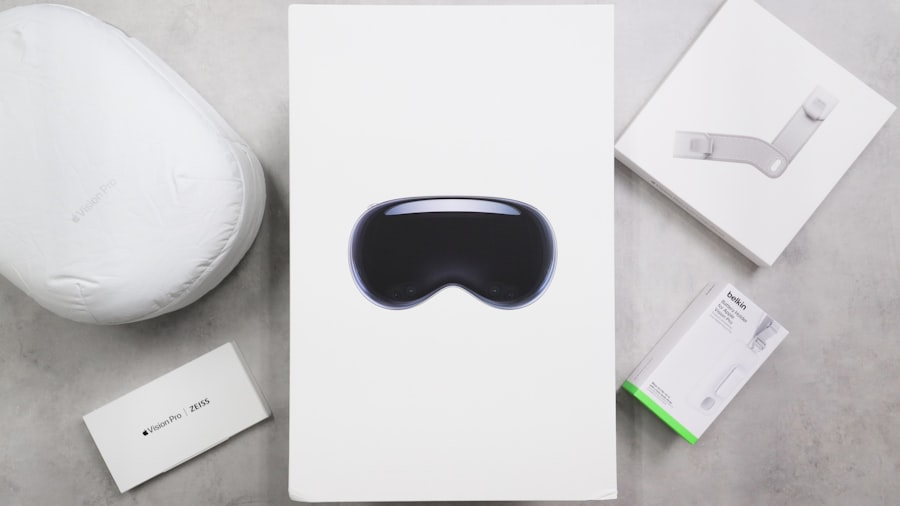
When designing for Apple Vision Pro, adhering to specific design principles can significantly enhance the overall user experience. One fundamental principle is simplicity. You should strive to create interfaces that are clean and uncluttered, allowing users to focus on the content rather than being overwhelmed by extraneous elements.
This simplicity not only aids navigation but also helps users feel more comfortable in the immersive environment. Another critical principle is consistency. As you develop applications for Apple Vision Pro, maintaining a consistent visual language and interaction model across different experiences is vital.
This consistency helps users build familiarity with the interface, reducing cognitive load and making it easier for them to engage with various features. Additionally, incorporating feedback mechanisms—such as visual cues or haptic responses—can enhance user understanding and satisfaction, guiding them through their interactions in a more intuitive manner.
Creating Immersive Environments for XR
| Metrics | 2019 | 2020 | 2021 |
|---|---|---|---|
| Number of XR experiences created | 100 | 150 | 200 |
| Percentage of users satisfied with immersion | 75% | 80% | 85% |
| Investment in XR technology (in millions) | 50 | 75 | 100 |
Creating immersive environments for XR requires a thoughtful approach that considers both visual fidelity and interactivity. As you design these spaces for Apple Vision Pro, you should focus on crafting rich, detailed environments that captivate users’ attention. High-quality graphics, realistic textures, and dynamic lighting can significantly enhance the sense of presence, making users feel as though they are truly part of the virtual world.
Interactivity is another crucial aspect of immersive environments. You should design experiences that encourage exploration and engagement, allowing users to interact with objects and elements within the space. This could involve incorporating physics-based interactions or enabling users to manipulate their surroundings in meaningful ways.
By fostering a sense of agency within the environment, you can create experiences that are not only visually stunning but also deeply engaging.
Integrating Gestures and Interactions in Apple Vision Pro
Gestures play a pivotal role in how you interact with XR environments on Apple Vision Pro. As you design these interactions, it’s essential to consider the natural movements users are likely to make in real life. Intuitive gesture recognition can enhance the overall experience by allowing users to navigate and manipulate content effortlessly.
For instance, pinch-to-zoom or swipe gestures can provide a familiar touchpoint for users transitioning from traditional devices to immersive environments. In addition to gestures, incorporating voice commands can further enrich interactions within Apple Vision Pro. By enabling users to control aspects of their experience through voice, you can create a more hands-free environment that feels fluid and responsive.
This combination of gestures and voice interactions not only enhances usability but also allows for a more inclusive experience, accommodating users with varying levels of physical ability.
Accessibility and Inclusivity in XR Design
As you embark on designing for Apple Vision Pro, prioritizing accessibility and inclusivity is essential. XR technology has the potential to reach diverse audiences, but it is crucial to ensure that your designs cater to individuals with varying abilities and needs. This means considering factors such as visual impairments, hearing loss, and mobility challenges when creating your experiences.
Implementing features like adjustable text sizes, audio descriptions, and customizable controls can significantly enhance accessibility in your designs. Additionally, conducting user testing with individuals from diverse backgrounds can provide valuable insights into how your application can be improved to accommodate a wider range of users. By fostering an inclusive environment in your XR experiences, you not only expand your audience but also contribute to a more equitable digital landscape.
Optimizing Performance for Apple Vision Pro
Performance optimization is a critical aspect of designing for Apple Vision Pro. As you create immersive experiences, ensuring smooth performance is vital for maintaining user engagement and satisfaction. High frame rates and low latency are essential components of an enjoyable XR experience; any lag or stuttering can break immersion and lead to frustration.
To optimize performance effectively, you should focus on efficient asset management and rendering techniques. This may involve using level-of-detail (LOD) models to reduce the complexity of objects based on their distance from the user or implementing occlusion culling to avoid rendering objects that are not currently visible. Additionally, leveraging the powerful hardware capabilities of Apple Vision Pro can help you achieve stunning visuals without sacrificing performance.
Designing for Spatial Audio in XR
Spatial audio is a game-changer in creating immersive experiences within XR environments on Apple Vision Pro. By simulating sound from various directions and distances, spatial audio enhances the sense of presence and realism in your designs. As you incorporate this technology into your applications, consider how sound can guide users through their experiences or provide contextual information about their surroundings.
When designing spatial audio experiences, it’s essential to think about how sound interacts with the environment. For instance, sounds may be affected by obstacles or surfaces within the space, creating a more realistic auditory experience. By carefully crafting audio cues that align with visual elements and user interactions, you can create a cohesive experience that draws users deeper into the virtual world.
Balancing Realism and User Comfort in XR Experiences
Striking a balance between realism and user comfort is crucial when designing for Apple Vision Pro. While high levels of realism can enhance immersion, they may also lead to discomfort or motion sickness for some users. As you develop your experiences, it’s important to consider factors such as field of view (FOV), frame rates, and movement speed to ensure a comfortable experience.
To mitigate discomfort, you might implement techniques such as teleportation for navigation instead of smooth movement or provide options for users to adjust settings according to their preferences. By prioritizing user comfort while still delivering visually stunning experiences, you can create an environment where users feel at ease exploring the virtual world without sacrificing immersion.
Testing and Iterating User Experience for Apple Vision Pro
Testing and iterating on user experience is an ongoing process that should be integral to your design workflow for Apple Vision Pro applications. Gathering feedback from real users allows you to identify pain points and areas for improvement that may not be apparent during the initial design phase. Conducting usability tests with diverse groups can provide valuable insights into how different audiences interact with your application.
As you analyze feedback from testing sessions, be prepared to iterate on your designs continually. This may involve making adjustments to interface elements, refining interactions, or enhancing accessibility features based on user input. By embracing an iterative approach, you can ensure that your final product meets the needs of your audience while delivering an exceptional user experience.
Future Trends and Innovations in XR Design for Apple Vision Pro
Looking ahead, the future of XR design for Apple Vision Pro holds exciting possibilities as technology continues to evolve. Emerging trends such as artificial intelligence (AI) integration could revolutionize how users interact with XR environments by enabling more personalized experiences tailored to individual preferences and behaviors. Imagine applications that adapt dynamically based on user interactions or learning patterns—this level of customization could redefine engagement in XR.
Additionally, advancements in haptic feedback technology may further enhance immersion by providing tactile sensations that correspond with virtual interactions. As these innovations unfold, staying informed about industry trends will be crucial for designers looking to push the boundaries of what is possible within XR environments on Apple Vision Pro. By embracing these future trends and innovations, you can position yourself at the forefront of this rapidly evolving field while creating compelling experiences that captivate users for years to come.
In exploring the innovative landscape of spatial computing and user experience design for devices like the Apple Vision Pro, it’s also insightful to consider how technology brands can optimize their strategies for success. A related article that delves into this topic is titled “Unlocking Tech Brand Success with Generative Engine Optimization,” which discusses the importance of leveraging advanced technologies to enhance brand performance in the competitive tech market. You can read more about it
 and virtual reality (VR) technologies. It is designed to provide users with a seamless and immersive computing experience that integrates digital content with the real world.</p>
<h3>What is XR?</h3>
<p>XR, or extended reality, is an umbrella term that encompasses virtual reality (VR), augmented reality (AR), and mixed reality (MR). It refers to the use of computer technology to create immersive, interactive environments that blend the physical and digital worlds.</p>
<h3>How does spatial computing impact user experience design?</h3>
<p>Spatial computing has a significant impact on user experience design, as it requires designers to consider the physical environment in which the user will interact with digital content. Designers must create interfaces and interactions that seamlessly integrate with the user’s surroundings and provide a natural and intuitive experience.</p>
<h3>What are the challenges in designing user experience for spatial computing?</h3>
<p>Designing user experience for spatial computing presents several challenges, including the need to account for varying physical environments, user movements, and interactions with digital content. Designers must also consider factors such as depth perception, spatial awareness, and user comfort to create effective and engaging experiences.</p>
<h3>What are the potential applications of spatial computing?</h3>
<p>Spatial computing has a wide range of potential applications across industries, including gaming, education, healthcare, architecture, and retail. It can be used to create immersive training simulations, interactive educational experiences, virtual design and visualization tools, and innovative retail experiences, among other applications.</p>
<!--[googlesitekit-end-of-content]-->
</div>
</div>
</article>
<div class="post-share-bot">
<span class="info">Share.</span>
<span class="share-links spc-social spc-social-colors spc-social-bg">
<a href="https://www.facebook.com/sharer.php?u=https%3A%2F%2Fwww.wasifahmad.com%2Fdesigning-user-experience-for-apple-vision-pro-the-next-frontier-of-xr%2F" class="service s-facebook tsi tsi-facebook"
title="Share on Facebook" target="_blank" rel="nofollow noopener">
<span class="visuallyhidden">Facebook</span>
</a>
<a href="https://twitter.com/intent/tweet?url=https%3A%2F%2Fwww.wasifahmad.com%2Fdesigning-user-experience-for-apple-vision-pro-the-next-frontier-of-xr%2F&text=Designing%20User%20Experience%20for%20Apple%20Vision%20Pro%3A%20The%20Next%20Frontier%20of%20XR" class="service s-twitter tsi tsi-twitter"
title="Share on X (Twitter)" target="_blank" rel="nofollow noopener">
<span class="visuallyhidden">Twitter</span>
</a>
<a href="https://pinterest.com/pin/create/button/?url=https%3A%2F%2Fwww.wasifahmad.com%2Fdesigning-user-experience-for-apple-vision-pro-the-next-frontier-of-xr%2F&media=https%3A%2F%2Fwww.wasifahmad.com%2Fwp-content%2Fuploads%2F2025%2F11%2Fimage-30.jpg&description=Designing%20User%20Experience%20for%20Apple%20Vision%20Pro%3A%20The%20Next%20Frontier%20of%20XR" class="service s-pinterest tsi tsi-pinterest"
title="Share on Pinterest" target="_blank" rel="nofollow noopener">
<span class="visuallyhidden">Pinterest</span>
</a>
<a href="https://www.linkedin.com/shareArticle?mini=true&url=https%3A%2F%2Fwww.wasifahmad.com%2Fdesigning-user-experience-for-apple-vision-pro-the-next-frontier-of-xr%2F" class="service s-linkedin tsi tsi-linkedin"
title="Share on LinkedIn" target="_blank" rel="nofollow noopener">
<span class="visuallyhidden">LinkedIn</span>
</a>
<a href="https://www.tumblr.com/share/link?url=https%3A%2F%2Fwww.wasifahmad.com%2Fdesigning-user-experience-for-apple-vision-pro-the-next-frontier-of-xr%2F&name=Designing%20User%20Experience%20for%20Apple%20Vision%20Pro%3A%20The%20Next%20Frontier%20of%20XR" class="service s-tumblr tsi tsi-tumblr"
title="Share on Tumblr" target="_blank" rel="nofollow noopener">
<span class="visuallyhidden">Tumblr</span>
</a>
<a href="mailto:?subject=Designing%20User%20Experience%20for%20Apple%20Vision%20Pro%3A%20The%20Next%20Frontier%20of%20XR&body=https%3A%2F%2Fwww.wasifahmad.com%2Fdesigning-user-experience-for-apple-vision-pro-the-next-frontier-of-xr%2F" class="service s-email tsi tsi-envelope-o"
title="Share via Email" target="_blank" rel="nofollow noopener">
<span class="visuallyhidden">Email</span>
</a>
</span>
</div>
<section class="navigate-posts">
<div class="previous">
<span class="main-color title"><i class="tsi tsi-chevron-left"></i> Previous Article</span><span class="link"><a href="https://www.wasifahmad.com/preemptive-cybersecurity-ai-driven-defense/" rel="prev">Preemptive Cybersecurity: AI-Driven Defense</a></span>
</div>
<div class="next">
<span class="main-color title">Next Article <i class="tsi tsi-chevron-right"></i></span><span class="link"><a href="https://www.wasifahmad.com/unleashing-the-power-of-generative-ai-for-strategic-decision-making/" rel="next">Unleashing the Power of Generative AI for Strategic Decision-Making</a></span>
</div>
</section>
<div class="author-box">
<section class="author-info">
<img alt=)