


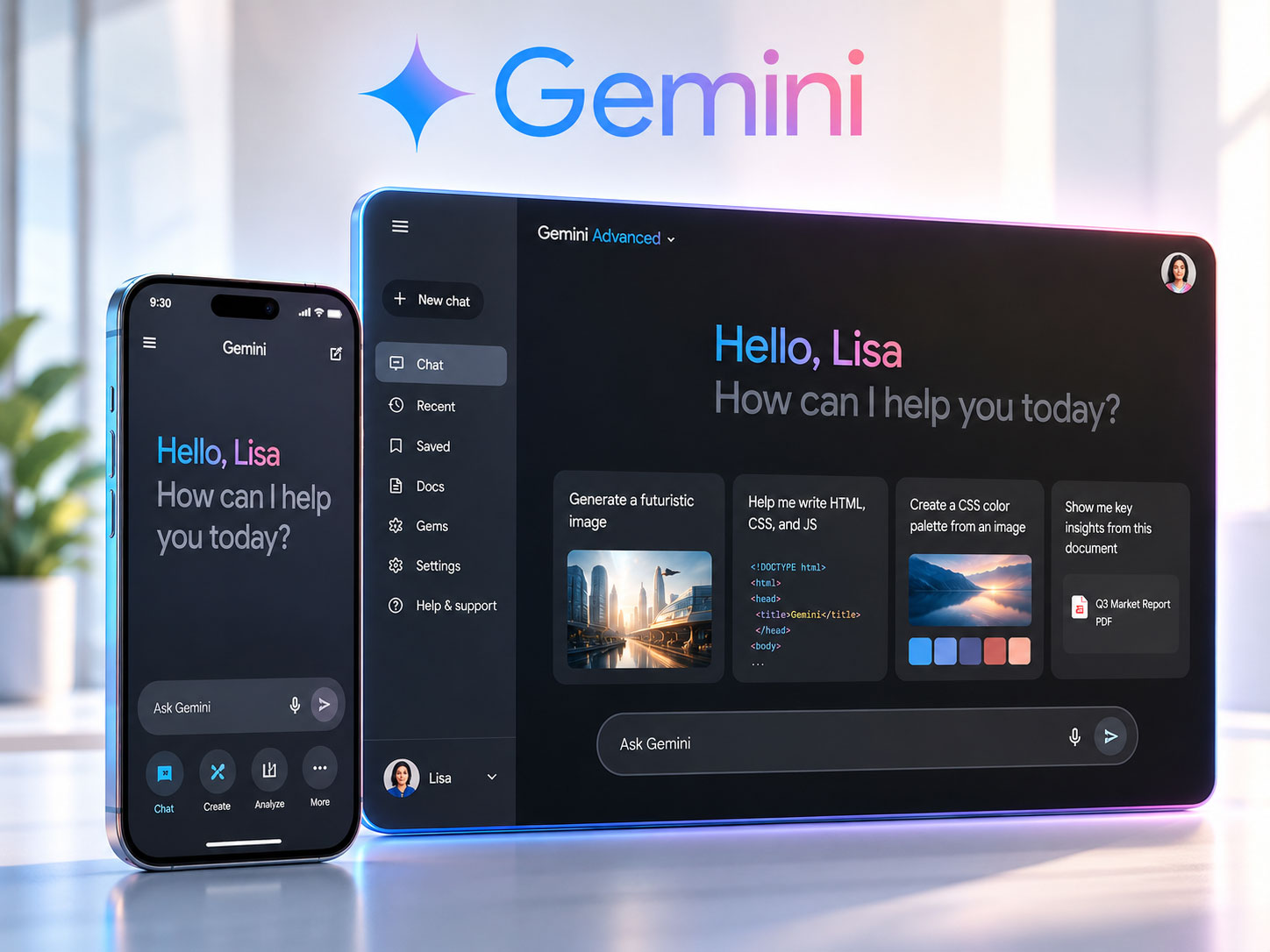
You’ve been waiting, and the moment has finally arrived. The latest Gemini app update is here, packed with groundbreaking tools and a refreshing design that promises to elevate your AI interaction to unprecedented heights. This isn’t just a minor patch; it’s a significant leap forward, redefining how you engage with your intelligent assistant. Prepare to dive into a world of enhanced capabilities, intuitive interfaces, and a personalized experience that truly understands your needs.
Before you even begin exploring the new features, you’ll undoubtedly notice the aesthetic overhaul. This isn’t just a cosmetic tweak; it’s a thoughtful redesign aimed at improving your user experience from the moment you open the app. Google’s design philosophy of clarity, functionality, and visual appeal shines through every pixel of this update.
Streamlined Navigation for Effortless Discovery
Gone are the days of searching for obscure settings or buried features. The new interface prioritizes ease of access. You’ll find a clean, uncluttered layout that makes navigating through Gemini’s diverse functionalities a breeze. The most frequently used options are now prominently displayed, reducing the cognitive load and allowing you to focus on what truly matters: getting things done.
- Intuitive Bottom Bar: Your essential tools are now conveniently located in a redesigned bottom navigation bar. This ensures one-tap access to your chats, extensions, and settings, placing control directly at your fingertips. No more awkward reaches or multiple taps to get to where you need to be.
- Contextual Side Panels: When you’re engaged in a specific task, relevant options and information will intelligently appear in a contextual side panel. This dynamic approach keeps your main workspace clean while providing immediate access to task-specific tools, such as referencing past conversations or integrating with other apps.
Enhanced Visuals for a More Engaging Experience
Beyond just function, Google understands the importance of form. The new design isn’t just practical; it’s visually appealing, creating a more enjoyable and less fatiguing experience, especially during extended interactions.
- Refined Typography and Color Palette: You’ll notice crisper fonts and a refreshed color palette that’s both modern and easy on the eyes. The new color scheme promotes readability and reduces visual clutter, allowing your focus to remain on the content of your conversations. Subtle animations add a touch of polish without being distracting.
- Dynamic Backgrounds and Themes: Personalization takes center stage with the introduction of dynamic backgrounds and themes. You can now choose from a curated selection of visually pleasing backgrounds that adapt to the time of day or your personal preferences. This allows you to tailor the app’s aesthetic to your mood and environment, making your interactions feel truly your own.
Accessibility at the Forefront
Google’s commitment to inclusivity is evident in the redesigned interface. Developers have meticulously considered users with diverse needs, ensuring that the app is accessible to everyone.
- Improved Contrast Ratios: The new color palette and typography selections have been rigorously tested to meet and exceed accessibility guidelines for contrast, ensuring that text is easily readable for users with visual impairments.
- Scalable Text and UI Elements: You now have greater control over text size and the scaling of UI elements, allowing you to customize the interface to your preferred readability settings. This empowers you to create an environment that best suits your individual visual needs.
- Enhanced Voice Control Integration: For users who prefer or require voice interaction, the update includes tighter integration with system-level voice control features, making hands-free navigation and interaction smoother and more responsive than ever before.
The recent Gemini App update introduces a variety of new tools and design changes that enhance user experience and streamline workflows. For those interested in optimizing communication within their teams, a related article titled “A Leader’s Guide to Adopting Asynchronous Communication” offers valuable insights on how to effectively implement asynchronous communication strategies. This approach can complement the new features in the Gemini App by fostering better collaboration among team members. You can read more about it here: A Leader’s Guide to Adopting Asynchronous Communication.
Unlocking New Horizons: Expanded Tool Integrations
The true power of an AI lies not just in its individual capabilities but in its ability to seamlessly integrate with the tools you already use. This update significantly expands Gemini’s integration ecosystem, transforming it into a central hub for your digital life.
Deep Dive into Workspace Productivity
For those of you who rely heavily on Google Workspace, prepare for a paradigm shift in how you get work done. Gemini is now deeply intertwined with your essential productivity apps, making your workflow smoother and more efficient.
- Google Docs, Sheets, and Slides Integration: Imagine needing to summarize a lengthy document, pull specific data from a spreadsheet, or brainstorm ideas for a presentation. You can now direct Gemini to interact directly with your Google Docs, Sheets, and Slides files. Ask for summaries, data analysis, content generation, or even stylistic suggestions, all without leaving the Gemini interface. This is a game-changer for content creators and knowledge workers.
- Gmail and Calendar Synergy: Your inbox and calendar are often the nerve centers of your day. Gemini can now assist with managing both. Ask it to draft email replies based on context from previous conversations, schedule meetings directly in your calendar, or even remind you of important deadlines by pulling information from your upcoming events. You’re essentially gaining a hyper-efficient personal assistant for your professional life.
Bridging the Gap to External Services
It’s not just about Google’s ecosystem; Gemini is now extending its reach to popular third-party services, understanding that your digital life spans beyond a single company.
- Real-time Information from Popular Web Services: Need to check the latest stock prices, compare product reviews from multiple e-commerce sites, or find out the current weather forecast for a specific location? Gemini can now tap into a wider array of real-time web services, providing you with up-to-the-minute information and making your research incredibly efficient. This transforms Gemini into a powerful information aggregator.
- Enhanced Travel Planning with Integrated Platforms: Planning a trip used to involve juggling multiple tabs and apps. Now, you can ask Gemini to research flights, compare hotel prices, and even suggest local attractions, drawing information from various travel platforms. This streamlined approach simplifies your travel planning, allowing you to focus on the excitement of your upcoming journey.
Personalized Recommendations and Actions
The more you use Gemini, the smarter it gets at understanding your preferences and anticipating your needs. This update significantly boosts its ability to provide personalized recommendations and proactive actions.
- Context-Aware App Launching: Based on your current conversation or recent activity, Gemini can now intelligently suggest launching relevant applications. For example, if you’re discussing a recipe, it might suggest opening your cooking app. If you’re talking about a particular location, it might offer to open Maps. This subtle yet powerful feature anticipates your next move, saving you time and effort.
- Proactive Information Delivery: Imagine Gemini noticing you’ve mentioned an upcoming event and, without being prompted, providing you with relevant information like weather forecasts for that day, traffic updates to the venue, or even a local restaurant recommendation. This proactive approach transforms Gemini from a reactive tool to an intelligent companion that anticipates your needs.
Empowering Your Creativity: Advanced Content Generation
Gemini has always been adept at generating text, but this update takes content creation to a whole new level. You now have more control, more options, and more power to bring your ideas to life.
Granular Control Over Output Style and Tone
No two writing tasks are the same. A formal business email requires a different tone than a casual social media post. Gemini now empowers you with precise control over the style and tone of its generated content.
- Pre-defined Style Presets: Choose from a range of pre-defined style presets, such as “formal,” “informal,” “persuasive,” “informative,” “creative,” or “journalistic.” These presets allow you to quickly tailor the output to the specific context of your writing.
- Customizable Tone Sliders: For even finer control, you can utilize tone sliders to adjust parameters like formality, confidence, enthusiasm, and even humor. This allows you to fine-tune the emotional impact of the generated text, ensuring it perfectly aligns with your intentions.
- Audience-Specific Adaptations: Tell Gemini your target audience, and it will adapt its language and approach accordingly. Whether you’re writing for children, industry experts, or the general public, Gemini will craft content that resonates effectively.
Multi-Modal Content Generation (Text and Beyond)
The world isn’t just text. Increasingly, content involves a rich blend of different media. Gemini is evolving to meet this need, allowing you to generate more than just words.
- Integrated Image Generation (powered by Imagen 2): Describe the image you envision, and Gemini will leverage Google’s cutting-edge Imagen 2 model to generate stunning visuals that complement your text. This is perfect for illustrating blog posts, creating social media graphics, or even conceptualizing creative projects.
- Basic Audio Snippet Generation: While still in its early stages of development, you can now experiment with generating short audio snippets, such as sound effects or basic voiceovers, directly within Gemini. Imagine adding a subtle atmospheric sound to a story or a quick voice tag to a presentation.
Enhancing Existing Content with AI-Powered Refinements
It’s not just about creating from scratch; Gemini can also act as your intelligent editor and rewriter, making your existing content shine.
- Advanced Summarization and Expansion: Have a long article you need to condense into key takeaways? Or a short bullet-point list you want to expand into a detailed explanation? Gemini can now perform these tasks with greater nuance and accuracy, understanding the core message and maintaining coherence.
- Grammar, Spelling, and Style Corrections: Beyond basic spellcheck, Gemini can identify and suggest improvements for complex grammatical errors, stylistic inconsistencies, and even awkward phrasing, elevating the overall quality of your writing.
- Translation with Contextual Nuance: While machine translation has come a long way, Gemini takes it a step further by considering the context of your conversation or document, providing more accurate and naturally sounding translations that respect cultural nuances.
Supercharging Your Efficiency: Intelligent Task Automation

Why spend time on repetitive tasks when Gemini can do them for you? This update introduces powerful automation capabilities, allowing you to streamline your workflow and reclaim valuable time.
Custom Routines and Shortcuts
Imagine having a personalized assistant that performs a series of actions with a single command. With custom routines, that’s now a reality.
- Personalized “Morning Briefing” Routine: Set up a routine that, with a simple voice command like “Good morning, Gemini,” automatically triggers a sequence of actions: telling you the weather, summarizing your calendar for the day, highlighting important emails, and even playing your favorite morning playlist.
- Task-Specific Automation Chains: For example, you could create a “Project Update” routine that automatically drafts an email to your team, pulls relevant data from a shared spreadsheet, and adds a reminder for your next project meeting to your calendar, all from a single prompt.
- Integration with Smart Home Devices: For those with a connected home, Gemini can now extend its automation to your smart devices. Imagine a “Leaving Home” routine that turns off your lights, adjusts the thermostat, and locks your doors with a single command.
Proactive Suggestions for Time-Saving Actions
Gemini isn’t just waiting for your commands; it’s actively looking for opportunities to help you save time and effort through intelligent, proactive suggestions.
- Meeting Preparation Prompts: Based on your upcoming calendar events, Gemini might proactively suggest relevant documents to review, contacts to reach out to, or even topics to research in anticipation of a meeting.
- Reply Suggestions for Common Queries: If you frequently receive similar types of emails or messages, Gemini can learn your preferred responses and offer quick-reply suggestions, significantly speeding up your communication.
- Contextual Reminders for Pending Tasks: If you’ve mentioned a task in a conversation but haven’t acted on it, Gemini might gently remind you or offer to create a reminder in your task management app, ensuring nothing falls through the cracks.
The recent Gemini App update introduces a variety of new tools and design changes that enhance user experience and functionality. Users can now take advantage of improved navigation and additional features aimed at streamlining their financial management processes. For those interested in exploring more about effective financial strategies for startups, a related article can be found here, providing valuable insights that complement the updates in the Gemini App.
Enhanced Privacy and Security Features
| Feature | Description |
|---|---|
| New Tools | The update introduces new tools to enhance user experience and functionality. |
| Design Changes | The app’s design has been updated to improve aesthetics and usability. |
| Performance Improvements | The update includes performance enhancements for smoother operation. |
| Bug Fixes | Various bugs and issues have been addressed and resolved in this update. |
In an increasingly digital world, the importance of privacy and security cannot be overstated. Google understands this, and this update reinforces its commitment to protecting your data and giving you greater control.
Granular Data Control and Transparency
You deserve to know how your data is being used and to have the power to manage it. This update brings enhanced transparency and control right to your fingertips.
- Redesigned Privacy Dashboard: A revamped privacy dashboard provides a clear overview of the data Gemini collects, how it’s used to personalize your experience, and gives you straightforward options to manage or delete specific types of data.
- Per-Feature Data Retention Settings: You now have the ability to set different data retention policies for various Gemini features. For example, you might choose to retain your chat history for a longer period while having image generation prompts deleted after a shorter time.
- Clearer Explanations of Data Usage: Google has invested in providing more understandable and concise explanations of its data policies, ensuring you can make informed decisions about your privacy settings.
Robust Security Measures and Best Practices
Behind the scenes, Google continues to implement industry-leading security protocols to safeguard your interactions and personal information.
- End-to-End Encryption for Sensitive Interactions: For specific sensitive interactions and when integrating with certain secure services, Gemini now leverages enhanced end-to-end encryption, ensuring that your data remains private and secure from unauthorized access.
- Regular Security Audits and Updates: Google’s security teams are continuously monitoring for new threats and vulnerabilities. This update includes the latest security patches and enhancements, ensuring that Gemini remains a secure platform for your digital interactions.
- Two-Factor Authentication Enhancements: For users who opt for enhanced account security, the update brings refinements to Two-Factor Authentication (2FA), making the process smoother while maintaining its robust protective capabilities.
Anonymous Mode for Private Explorations
Sometimes, you just want to experiment or ask a sensitive question without it being linked to your personal data or influencing future recommendations. Anonymous Mode addresses this need directly.
- Ephemeral Session Management: When you activate Anonymous Mode, Gemini creates an isolated, ephemeral session. Any interactions within this mode are not linked to your Google account, are not used to personalize future experiences, and are not retained long-term.
- Easy Activation and Deactivation: Switching to and from Anonymous Mode is a simple, clearly labeled toggle, giving you immediate control over when your interactions are private.
- Clear Indicators of Anonymous Status: When in Anonymous Mode, distinct visual cues will be present in the user interface, clearly indicating that your session is private and that interactions will not be stored or used for personalization. This provides peace of mind and clarity during sensitive queries.
You’ve now seen a comprehensive overview of the transformative updates that await you in the latest Gemini app. From a sleek new design that enhances usability to expanded integrations that weave Gemini seamlessly into your digital life, and from powerful creative tools to intelligent automation and robust privacy controls – this update is designed with you in mind. It’s about making your interactions with AI more intuitive, more productive, and more secure. Dive in, explore, and let Gemini reshape the way you work, create, and connect. Your smarter digital companion is ready to impress.
FAQs
What are the new tools added in the Gemini app update?
The new tools added in the Gemini app update include a budget tracker, investment analysis tools, and a simplified trading interface.
What design changes were made in the Gemini app update?
The design changes in the Gemini app update include a refreshed user interface with improved navigation, updated color schemes, and enhanced charting features.
How will the budget tracker in the Gemini app update help users?
The budget tracker in the Gemini app update will help users track their spending, set financial goals, and manage their expenses more effectively.
What are the benefits of the investment analysis tools in the Gemini app update?
The investment analysis tools in the Gemini app update will provide users with insights into their investment performance, portfolio diversification, and risk assessment.
How can users access the new tools and design changes in the Gemini app update?
Users can access the new tools and design changes in the Gemini app update by downloading the latest version of the app from the App Store or Google Play Store.
