


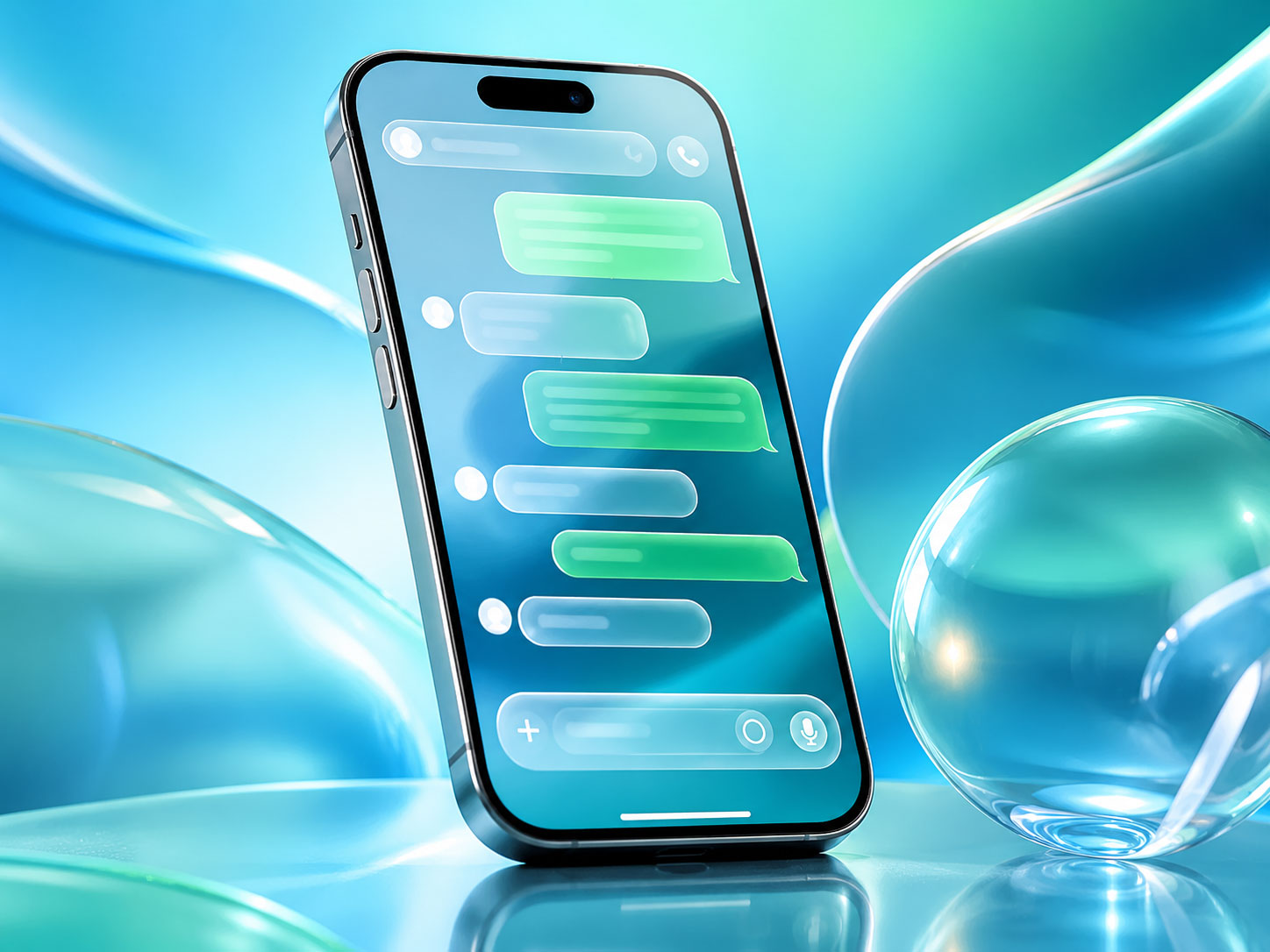
You’ve probably heard the buzz. That subtle shift in your WhatsApp interface, the new gleam on your bubbles, the way elements seem to flow and meld – it’s not your imagination. WhatsApp has rolled out a significant visual overhaul, and it’s particularly striking on iOS. This isn’t just a fresh coat of paint; it’s a re-imagining of how you interact with one of your most essential communication tools. You’re experiencing firsthand what many are calling the “Liquid Glass UI,” and it’s set to transform your daily chat experience.
You might be wondering, what exactly is Liquid Glass UI? It’s more than just a fancy marketing term; it’s a design philosophy that WhatsApp has meticulously integrated into its iOS application. Think translucency, depth, and a sense of fluidity. It’s about creating an interface that feels less like static buttons and more like a dynamic, living canvas. You’ll notice how elements no longer feel rigidly separate but instead subtly blend into the background, allowing the content – your conversations – to take center stage.
The Power of Translucency
You’ll immediately recognize the enhanced use of translucency. This isn’t just about making things see-through; it’s about creating a sense of depth.
- Blurred Backgrounds: Observe how your chat list or individual chat headers now subtly blur the content behind them. This isn’t a distraction; it’s a way to establish visual hierarchy. Your current interaction is always in focus, but you still get a ghost of what’s beneath, adding richness to the visual experience. You’ll find yourself appreciating how this subtle blur keeps your focus on the foreground elements while still acknowledging the underlying structure.
- Dynamic Overlays: When you pull down to search, or open certain menus, you’ll notice overlays that aren’t opaque. They gently obscure the background, rather than completely blocking it out. This creates a more pleasant transition and keeps you grounded in the overall app environment. You’re not being taken to a completely new screen; you’re simply revealing a layer on top of your current view.
The Illusion of Depth
Beyond translucency, WhatsApp has masterfully employed techniques to create a sense of three-dimensionality. You’ll feel like elements have weight and occupy their own space.
- Subtle Shadows: Look closely at chat bubbles, buttons, and navigation elements. You’ll detect incredibly subtle shadows that lift them slightly off the background. This isn’t the heavy drop shadows of yesteryear; these are nuanced, almost imperceptible gradients that create a sophisticated sense of depth. You might not consciously notice them, but your brain processes it as elements having a distinct presence.
- Layered Interface: The entire UI now feels more layered. You have your background, then your main content, and then interactive elements floating above. This layering isn’t just aesthetic; it’s functional, guiding your eye and highlighting interactive areas. You’ll find your intuition about where to tap or swipe is subtly enhanced by this clear visual separation of layers.
Fluidity in Motion
The “Liquid” part of Liquid Glass refers to the animation and transitions, which are now smoother and more natural. You’ll feel a seamlessness that wasn’t there before.
- Refined Animations: When you open a chat, dismiss a menu, or send a message, the animations are incredibly polished. They don’t just appear or disappear; they flow. This fluidity makes the app feel more responsive and less jarring. You’re experiencing micro-interactions that feel less like software and more like a natural response to your touch.
- Elastic Scrolling: Pay attention to how scrolling behaves. There’s a slight elasticity, a gentle bounce, especially at the edges of lists. This small detail adds to the tactile feel of the app, making it feel more forgiving and responsive to your gestures. You’ll notice this particularly when you scroll quickly through a long conversation or a packed chat list.
In addition to the exciting advancements brought by the WhatsApp Liquid Glass UI for iOS chats, users may also find interest in exploring how to enhance their overall connectivity experience. A related article discusses the benefits of AT&T internet, which can provide seamless connectivity for all your communication needs. You can read more about it here: Unlocking the Power of AT&T Internet for Seamless Connectivity.
Your Chat Bubbles Reimagined: A More Expressive Conversation
The most prominent manifestation of the Liquid Glass UI is arguably in the chat bubbles themselves. These aren’t just containers for text anymore; they’re integral to the visual flow of your conversations.
Softer Edges, Gentler Presence
You’ll immediately notice that the hard, defined edges of the old chat bubbles are gone. They’ve been replaced with softer, more rounded contours.
- Organic Shapes: The new bubbles have a more organic, almost pillow-like appearance. This makes the conversation feel warmer and less rigid. It’s less like reading a document and more like engaging in a friendly exchange. You’ll feel a sense of comfort as these softer shapes present your messages.
- Subtle Gradients: While not overtly gradient-filled, there’s a very subtle play of light and shadow within the bubbles, especially on those you’ve sent. This contributes to the feeling of depth and gives them a slightly iridescent quality, like polished glass. You might catch a fleeting glimmer as you scroll past.
The Color Palette: A Breath of Fresh Air
WhatsApp has also subtly tweaked its color palette, moving towards a more contemporary and sophisticated aesthetic.
- Muted Tones: The vibrant greens and blues that were once characteristic have been subtly muted. They now feel more refined, less stark. This allows the content of your messages to stand out without the UI screaming for attention. You’ll find the new colors easier on the eyes during extended chat sessions.
- Enhanced Contrast: Despite the milder tones, WhatsApp has maintained excellent contrast for readability. The text against the new bubble colors is clear and crisp, ensuring that accessibility hasn’t been sacrificed for aesthetics. You won’t be squinting to read messages in varying lighting conditions.
Dynamic Interaction with Media
Sending photos, videos, and even voice notes now feels more integrated into the conversation flow.
- Integrated Previews: Media previews within the chat bubbles look more seamless. They blend better with the bubble itself, feeling less like separate objects arbitrarily placed. You’ll notice how images might subtly overlap with the bubble’s edge, creating a more organic look.
- Fluid Playback Controls: When you play a voice note, the controls appear with a similar fluidity, emerging gently and receding smoothly. This consistent animation language reinforces the overall Liquid Glass feel. You’ll appreciate the understated elegance of these interactions.
Beyond Bubbles: System-Wide Enhancements

The Liquid Glass UI isn’t confined to your conversations alone. WhatsApp has meticulously applied this aesthetic throughout the entire iOS application experience. You’ll encounter these refinements from the moment you open the app.
Redesigned Navigation Bar
Your primary navigation at the bottom of the screen has received a significant facelift, making it more intuitive and visually appealing.
- Iconography Refresh: The icons for Chats, Updates, Communities, Calls, and Settings have been redesigned. They are cleaner, more modern, and possess a subtle depth that aligns with the Liquid Glass theme. You’ll find them instantly recognizable yet noticeably fresh.
- Subtle Glow on Selection: When you tap on a navigation item, there’s a subtle, almost ethereal glow or highlight that appears, rather than a harsh color change. This gentle feedback mechanism is another characteristic of the fluid UI. You’ll feel a softer connection to your selections.
Settings and Information Screens
Even the utilitarian parts of the app, like the settings menu or contact information screens, now benefit from this new design language.
- Cleaner Layouts: Information is presented with more breathing room. The use of white space is more deliberate, reducing visual clutter and making it easier for you to scan and find what you need. You’ll no longer feel overwhelmed by dense blocks of text.
- Translucent Elements in Menus: When you delve into sub-menus or overlays, you’ll see the consistent application of translucency. Headers, search bars, and even some dialog boxes reveal hints of the content beneath, enhancing the sense of a connected interface. You’ll appreciate how the app maintains visual coherence.
Profile Pages and Contact Information
Viewing someone’s profile has become a more refined experience.
- Streamlined Presentation: Profile pictures, status updates, and contact details are presented in a cleaner, more organized fashion. The previously somewhat dated design has been modernized to fit current iOS design standards. You’ll find it quicker to locate the information you need on a contact’s card.
- Dynamic Headers: When you scroll on a contact’s profile, the header often demonstrates a subtle parallax effect or dynamic resizing, adding to the feeling of depth and responsiveness. This little touch makes interactions feel more premium. You’ll notice the photo subtly shift or shrink, enriching the scrolling experience.
The Technical Underpinnings: How WhatsApp Achieved This
You might be curious about the “how.” Achieving such a seamless and fluid interface isn’t just about tweaking colors; it involves significant development effort. WhatsApp has leveraged modern iOS technologies to bring Liquid Glass to life.
Leveraging SwiftUI and Advanced Core Animation
Underneath the hood, WhatsApp is likely making extensive use of Apple’s latest UI frameworks.
- SwiftUI Integration: While WhatsApp is a mature app, it’s highly probable that they’ve begun integrating SwiftUI for new components or for a full rewrite of certain sections. SwiftUI excels at declarative UI design, making it easier to create complex animations and adaptable layouts that define the Liquid Glass look. You’ll benefit from the inherent performance and responsiveness that SwiftUI offers.
- Core Animation Mastery: For the sophisticated blurring, subtle shadows, and fluid transitions, WhatsApp engineers are undoubtedly masters of Core Animation. This low-level framework allows for precise control over visual effects and animations, ensuring they are buttery smooth and performant, even on older devices. You’re experiencing the direct results of finely tuned animation curves and rendering techniques.
Focus on Performance and Battery Efficiency
A beautiful UI is moot if it drains your battery or makes the app sluggish. WhatsApp has clearly prioritized performance.
- Optimized Rendering: The translucency and depth effects are designed to be efficient. They don’t excessively tax the GPU, meaning your device remains responsive and your battery life isn’t significantly impacted. You won’t notice any lag or stuttering as you navigate through the newly designed interface.
- Intelligent Caching: WhatsApp undoubtedly employs intelligent caching strategies for UI elements and animations. This means frequently accessed components are readily available, contributing to the “liquid” feel by reducing load times and rendering delays. You’ll find the app feels snappier and more instant.
Accessibility Considerations
While focusing on aesthetics, WhatsApp hasn’t forgotten about accessibility.
- Customizable Settings: The new UI aims to be broadly appealing, but it’s crucial that it remains adaptable. You’ll find that text size adjustments, high contrast modes (if available), and other accessibility features continue to work seamlessly with the new design, ensuring inclusivity. You’ll be able to tailor the experience to your specific visual needs.
- Clear Visual Feedback: Despite the subtlety, interaction points provide clear visual feedback. Buttons highlight, lists scroll with resistance, and taps are acknowledged. This ensures that users with varying visual acuity can still confidently interact with the app. You’ll never be left guessing whether your tap was registered.
The recent update to WhatsApp’s Liquid Glass UI has transformed the chat experience for iOS users, offering a sleek and visually appealing interface that enhances usability. This upgrade not only improves aesthetics but also introduces new features that streamline communication. For those looking to further enhance their productivity while using apps like WhatsApp, exploring techniques to minimize distractions can be beneficial. You can find valuable insights in a related article about embracing focus through the Monk Mode Challenge, which provides practical strategies for eliminating distractions. Check it out here.
Your New WhatsApp Experience: Impact and Future Implications
| Aspect | Details |
|---|---|
| Feature | Liquid Glass UI upgrade for iOS chats |
| Impact | Stunning visual enhancement |
| Platform | iOS |
| Application |
So, what does this all mean for you, the everyday WhatsApp user? It’s more than just a pretty face; it’s an elevated user experience that subtly enhances your daily digital interactions.
A More Engaging and Enjoyable Platform
You’ll likely find yourself spending more time in the app, not because of new features necessarily, but because the environment itself is more pleasant.
- Reduced Eye Strain: The softer colors and more spacious layouts contribute to a less fatiguing visual experience, especially during prolonged use. You might notice your eyes feel less tired after a long chat session.
- Enhanced User Satisfaction: A well-designed, fluid app simply feels better to use. This increased satisfaction translates into a more positive overall perception of WhatsApp as a tool. You’ll feel a subtle sense of delight with each interaction.
- Modern Aesthetic: The Liquid Glass UI brings WhatsApp firmly into the contemporary design landscape. It sheds any lingering vestiges of older design philosophies, positioning it as a modern, forward-thinking application. You’ll feel like you’re using a cutting-edge app.
Setting a New Standard for Chat Apps
WhatsApp’s move with the Liquid Glass UI is significant. It demonstrates a commitment to design excellence that could ripple through the industry.
- Influencing Competitors: Other messaging apps will undoubtedly take note. The bar for UI design in instant messaging has just been raised, and you might see similar design philosophies emerging elsewhere as a result. You could be experiencing a trend-setter.
- Continued Evolution: This isn’t likely the final form of WhatsApp’s UI. The Liquid Glass aesthetic provides an excellent foundation for future enhancements, new features, and continued refinement. You can anticipate even more thoughtful design updates down the line. You’re witnessing an ongoing design journey.
Personalized Touch
While the Liquid Glass UI introduces a consistent aesthetic, you can still infuse your personal style.
- Wallpaper Integration: Your chosen chat wallpapers now interact with the new interface in a more sophisticated way. The translucent elements will subtly reveal hints of your wallpaper, creating a cohesive and personalized backdrop for your conversations. You’ll appreciate how your chosen background feels more integrated.
- Dark Mode Synergy: If you’re a Dark Mode enthusiast (and you probably should be!), the Liquid Glass UI looks even more striking. The interaction of translucent dark elements with subtle blurs and depth creates a truly premium and immersive experience. You’ll find it incredibly easy on the eyes in low-light conditions.
In essence, WhatsApp’s Liquid Glass UI is a testament to the power of thoughtful design. It’s not about flashy new features you have to learn; it’s about a profound, yet understated, upgrade to the very fabric of your digital communication. You’re not just sending messages; you’re experiencing them within an interface that feels more intuitive, more beautiful, and undeniably more modern. So, the next time you open WhatsApp, take a moment to appreciate the subtle polish, the gentle flow, and the quiet sophistication of your newly upgraded chat experience. You’re witnessing, and indeed participating in, a stunning visual evolution.
FAQs
What is WhatsApp Liquid Glass UI?
WhatsApp Liquid Glass UI is a new user interface design for iOS chats on the WhatsApp messaging app. It delivers a stunning upgrade to the visual appearance of chats, with a focus on sleek and modern design elements.
What are the key features of WhatsApp Liquid Glass UI?
The key features of WhatsApp Liquid Glass UI include a more refined and polished look for chat bubbles, improved typography, and enhanced use of color gradients. The UI also introduces subtle animations and transitions for a more dynamic user experience.
Is WhatsApp Liquid Glass UI available for all iOS users?
As of now, WhatsApp Liquid Glass UI is only available for a limited number of iOS users as part of a beta testing phase. It is expected to be rolled out to all iOS users in the near future as part of a wider update to the app.
How can iOS users access WhatsApp Liquid Glass UI?
iOS users can access WhatsApp Liquid Glass UI by joining the WhatsApp beta testing program through the TestFlight app. Once enrolled in the beta program, users will receive access to the latest updates and features, including the Liquid Glass UI.
What are the benefits of WhatsApp Liquid Glass UI for iOS users?
The benefits of WhatsApp Liquid Glass UI for iOS users include a more visually appealing and modern chat interface, improved readability, and a more engaging user experience. The UI upgrade aims to enhance the overall aesthetic and usability of WhatsApp chats on iOS devices.
